App Store
Ratings & Reviews
Early release response
Parallax Monitor App Store reviews
Loading reviews
Public US App Store reviews
Parallax Monitor · Now on the App Store
Scopes, LUTs, focus pulls, framing, audio, playback — and a full stills mode — from the iPhone or iPad already on your rig.
5.0 App Store rating 18 US ratings
Early release response
Loading reviews
Public US App Store reviews
Supported Nikon cameras
Running Parallax Monitor on another Z-series body? Tell us how it goes — compatibility grows with every report.
Exposure confidence
Channel-aware traffic lights give you a fast read on highlight and shadow pressure before a take goes sideways. Waveform and histogram scopes calibrated for Log3G10 (R3D), N-Log, and SDR.
Focus control
Tap to set focus, nudge manual focus in fine or coarse steps, rehearse repeatable pull moves, and trigger cinematic AF — without touching the camera body.
Framing & desqueeze
Anamorphic desqueeze at 1.33x, 1.5x, 1.8x, 2x, or any custom ratio — live. Stack multiple frame guides with dashed comparison lines for multi-delivery shoots.

Playback
Scan the camera card, stream clips, scrub, check audio, and preview with your monitoring LUT — all over WiFi, without crowding around the camera body.

Stills / Photo mode
Flip Parallax Monitor into photo mode and your phone becomes a complete stills command surface — exposure, capture, storage, and focus pages built for photography, not borrowed from video.
Fire the shutter from live view, then review every frame instantly over WiFi without touching the camera.

And that's not all
40+ camera controls, a fully customizable interface, full audio monitoring, and LUT workflows designed for how the ZR is actually shot.
Presets, status chips, tool pills, modern/monitor/classic HUD styles. Landscape toolbar placement and rotation lock.
Real-time level meters, input sensitivity and gain adjustment, all controllable from live view. No separate mixer.
Preview your LUT while exposure tools read the pre-LUT signal. Bundled Rec.709 profiles plus custom .cube import.
Shutter angle, dual base ISO, codec, resolution, frame rate, Kelvin, timecode, card slot — controls Nikon hasn't exposed anywhere else.
Ultra low-latency USB monitoring with every tool active — waveform, false color, peaking, and LUTs over a single cable.
Bonjour discovery, direct AP connection, quick reconnect, transport switching, and support log capture.
Gallery
Straight off the devices operators are running on set. Drag, scroll, or use the arrows — click any shot to inspect it.


Camera settings, exposure confidence, framing, focus, LUTs, audio, and playback in one native workflow — shaped around what Z shooters do during a real take.
See it in action
Real reviews from real filmmakers putting Parallax Monitor through its paces.
Coverage
Independent coverage of Parallax Monitor for Nikon ZR shooters.
 CineD
CineD
CineD covers Parallax Monitor's camera control, live feed, playback, focus, exposure, and framing tools for Nikon ZR users.
Read article →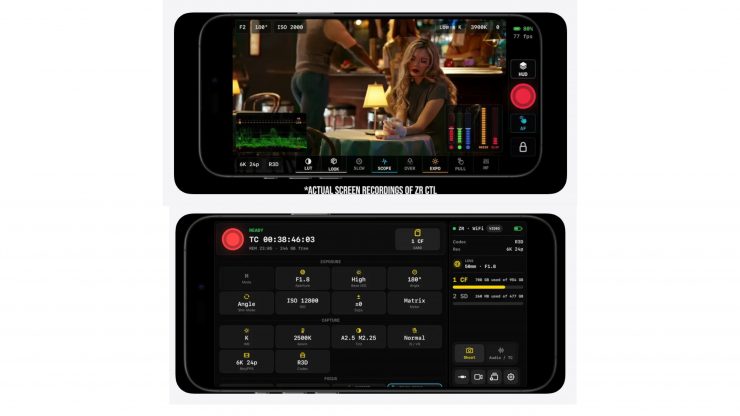 Newsshooter
Newsshooter covers the Parallax Monitor update with multicam, stills mode, multi-screen casting, X-zone false color, and playback file management.
Read article → No Film School
No Film School looks at Parallax Monitor as a smartphone control monitor with live view, LUT preview, framing guides, and camera-card playback.
Read article → PodcastVideos.com
PodcastVideos.com covers remote monitoring, exposure tools, wireless control, focus peaking, framing guides, and small-crew camera workflows.
Read article →FAQ
Install Parallax Monitor on your iPhone or iPad and connect to the camera over USB, your phone's hotspot, a shared WiFi network, or the camera's own access point. You get live view with scopes, full camera settings, focus control, audio, and camera-card playback — no extra hardware required.
Yes. Parallax Monitor is built for the Nikon ZR first, and Z8 and Z6III shooters have confirmed it working as a remote monitor and control surface on their bodies. Other Z-series cameras may work too — we'd love to hear your results.
Parallax Monitor is available now on the App Store for iPhone and iPad.
Use the beta tester application to share your iPhone or iPad, Nikon cameras, shooting background, and email address. Beta access is reviewed from those applications.
Yes. Paid Parallax Monitor purchases are covered by a 30-day, no-questions-asked full refund promise. App Store refund requests begin through Apple, and support is available if you need help.
Yes. If you are looking for ZR Ctl on iPhone or iPad, the iOS app is now called Parallax Monitor.
Parallax Monitor has a full photo mode: dedicated stills control pages for exposure, capture, storage, and focus, a remote shutter from live view, and instant photo review over WiFi.
Waveform, histogram, false color with legend, channel-aware traffic lights and goal posts, zebras, focus peaking (including R3D NE workflows), anamorphic desqueeze, custom frame guides, LUT preview with .cube import, and real-time audio meters — with ultra low-latency monitoring over USB.
Now available on the App Store. Your iPhone or iPad becomes the ultimate remote monitor and control surface for your Nikon, backed by a 30-day full refund promise.
iPhone · iPad · Version 1.1
Get it nowTry it on your own camera setup with no pressure. Paid purchases are covered by a no-questions-asked full refund promise.
iPhone · iPad · Nikon Z
Watch tutorialsLearn general controls, exposure tools, customization, and advanced workflows for Parallax Monitor.
iOS · iPadOS · Android
Apply to beta testApply with your cameras, Apple device, and shooting background so upcoming builds can be tested on real Nikon setups.